


FY 2026 Federal Agency Training Week
FY2026 Fed Week Program
FEDWEEK 2026 is scheduled for August 4 - August 6, 2026. The program overview, seminar descriptions, and registration instructions are provided for your information. The training is virtual only. Please note that registration for FEDWEEK 2026 starts June 8 and ends July 24, 2026.
Virtual Sessions Available in OSHA eLearning/Blackboard
|
CENTRAL TIME |
|
|
|
|
|---|---|---|---|---|
|
8:30am – 11:45 am |
6811 Tim Gackle |
6601 Signey Hernandez |
6104 Keith Erwin |
NONE |
| Lunch | ||||
|
1:00 pm – 4:15 pm |
6814 Managing a Respiratory Protection Program Justin Paxton |
6600 Martin Garcia |
6415 Tina Beacham- |
6108 Joel Gonzalez- |
|
CENTRAL TIME |
|
|
|
|
|---|---|---|---|---|
|
8:30am – 11:45 am |
6814 Justin Paxton |
6610 Peter Kleczynski |
6401 Carlos Gallegos |
6108 Joel Gonzalez- |
| Lunch | ||||
|
1:00 pm – 4:15 pm |
6805 Dave Novak |
6601 Signey Hernandez |
6104 Keith Erwin |
6810 Juan Nevarez & |
|
CENTRAL TIME |
|
|
|
|
|
|---|---|---|---|---|---|
|
8:30am – 11:45 am |
6805 Dave Novak |
6600 Martin Garcia |
6415 Tina Beacham- Bowden |
6810 Juan Nevarez & Migdaliz De Jesus |
|
| Lunch | |||||
|
1:00 pm – 4:15 pm |
6811 Tim Gackle |
6610 Peter Kleczynski |
6401 Carlos Gallegos |
NONE | |
FedWeek 2026 Self-Enrollment Procedures
Join the OSHA Training Institute (OTI) for FEDWEEK 2026 August 4 through August 6, 2026
We are excited to offer a variety of virtual options.
REGISTRATION IS OPEN: JUNE 8 THROUGH JULY 24, 2026
YOU MUST CREATE AN ACCOUNT AND THEN ENROLL PRIOR TO ATTENDING FEDWEEK
Note all times in Blackboard and included in this instruction are CENTRAL TIME.
BEFORE REGISTRATION OPENS:
- Create an account in Blackboard following the self-account creation process (only if you do not have an account). If you have an account that needs to be updated or are unsure if you have an account, contact Student Services at OTI.Registration@dol.gov.
AFTER REGISTRATION OPENS – JUNE 8 – JULY 24, 2026
- Enroll in the FedWeek seminar(s) you wish to attend; please note ALL sections are virtual this year; refer to the course schedule attached.
WHEN ATTENDING FEDWEEK VIRTUALLY:
- Use the Chrome browser and disconnect from the VPN for the best results. You may need to clear your cache/history.
- Blackboard can be accessed from any device that can connect to the internet.
- Sign in early to allow time for a short video on using the Collaborate virtual classroom in Blackboard.
- Ensure you have a working microphone.
- Follow instructions below in the ‘Accessing the Virtual Classroom’ section to access the virtual classroom.
CREATE AN ACCOUNT IN BLACKBOARD AND SELF-ENROLL IN FEDWEEK SEMINAR(S):
PART 1 – CREATE AN ACCOUNT
- Go to https://oshaelearning.geniussis.com/PublicWelcome.aspx to access Blackboard
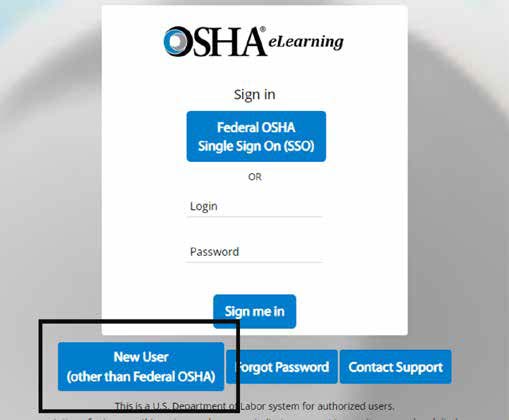
- Click the "New User" button to begin the process of creating an account. IMPORTANT: Do NOT create an account if you already have one. Also, creating an account does not mean you are enrolled in the Fed Week 2026 seminar(s). You must self-enroll into each section you wish to attend after your account is approved.
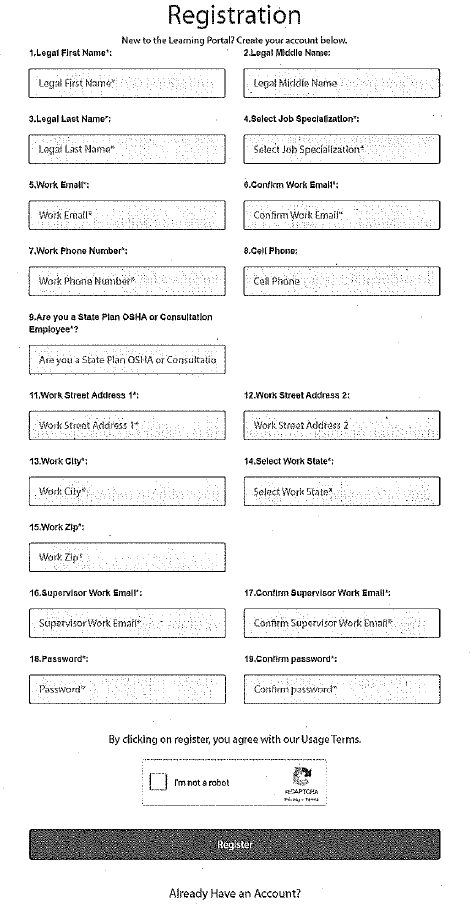
- Complete the "Registration" form.
- Once your account is approved, you will receive an automated welcome email from the Blackboard system.
IMPORTANT NOTE: Account approvals are NOT automated. Accounts generally go through final approval approximately 48 hours after receipt of request. Times vary due to the volume of requests which are processed in the order they are received. - For further self-account creation instructions see attached Job Aid.
PART 2 – SELF-ENROLL
- NOTE: All sessions are virtual and will NOT be available in-person in Arlington Heights, IL. None of these sessions are hybrid.
- Return to Blackboard Login page, enter your official work email and the password you created.
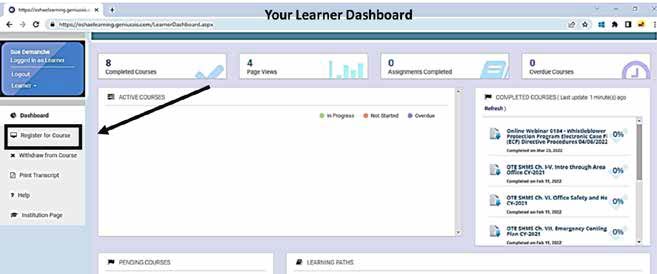
- You will arrive at your Learner Dashboard, in the left-hand column click "Register for Course."
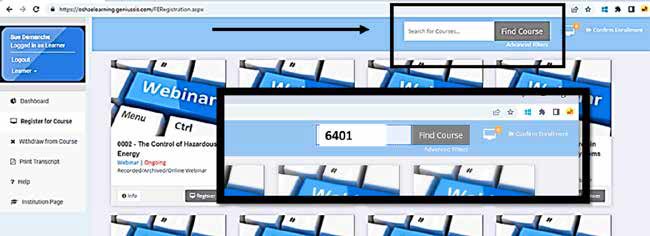
- In the search box, enter the number of the seminar you wish to attend from the FedWeek schedule (attached).
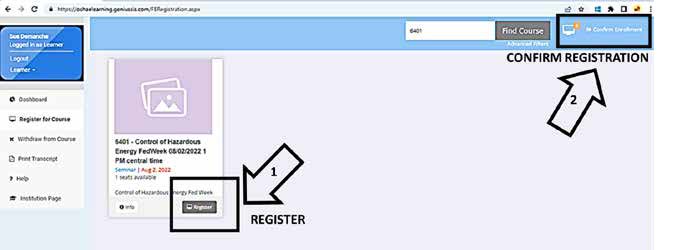
- Once you've chosen the date and time of the seminar for which you wish to enroll, click "register" (1 below) and then click "confirm enrollment" (2 below). Remember there are sections running concurrently, do not enroll in more than one section in each time frame..
- Return to your Dashboard to view the seminar(s) for which you have enrolled, listed in the "Active Courses" box.
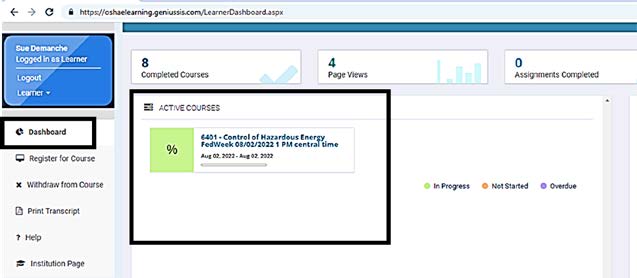
- Register in all the seminars you wish to attend.
SEMINAR CONTENTS IN BLACKBOARD:
From the Blackboard "Dashboard":
- Click on the course title in the "Active Courses" box.
- You will arrive on the Course Page, this is the contents of the seminar, "Welcome", the "Course Materials", and the "Completion Confirmation."
- Click on the course materials, you will have the option of viewing the materials in Blackboard or downloading them to an alternate location. Note that materials will no longer be available to you once FedWeek is closed.
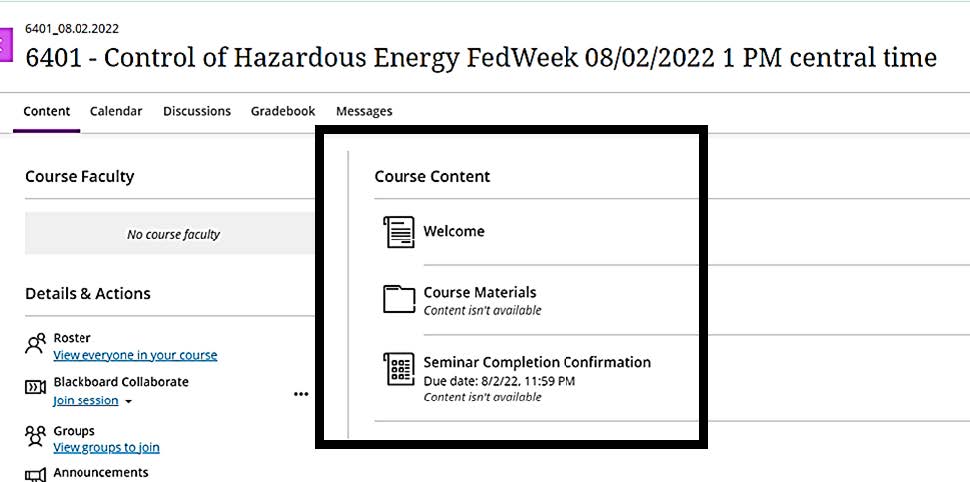
- When FedWeek is over and you have completed the seminar, confirm your completion by clicking on "Seminar Completion Confirmation."
ACCESSING THE VIRTUAL CLASSROOM:
NOTE: All sessions are virtual and will ONLY be available virtually. None of these sessions are hybrid.
- If you are attending virtual seminars, access the virtual classroom when the seminar is to begin from the Course Page. Click on the course title in the "Active Courses" box, you will arrive on the Course Page.
- In the left-hand column, you will see "Blackboard Collaborate" and under that "Join Session."
- Click on "Join Session" and a drop-down "Course Room" appears, click "Course Room."

CERTIFICATES OF COMPLETION:
- Once your attendance at a FedWeek seminar has been confirmed, you will be able to download and print certificates from your Blackboard "Dashboard" in the "Completed Courses" box.
- Click on the title of the course once, and "Download Certificate" will appear. Click to download.
Note it may take several weeks before your dashboard populates with the seminars you completed.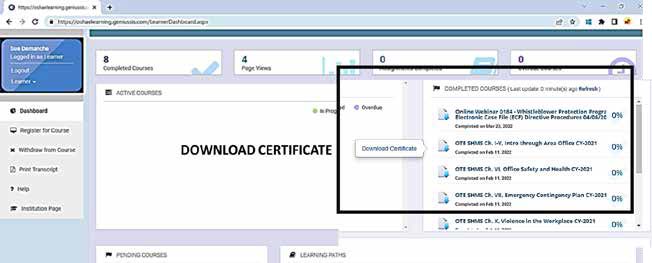
TIPS:
- If you’ve forgotten your password, enter your email and click "forgot password" on the Login page.
- Blackboard technical support can be requested by clicking "Contact Support" on the Login page.
- All times listed in this document and on Blackboard are CENTRAL.
- Space in FedWeek is limited; please cancel your enrollment in seminars you cannot attend.
- Note it may take several weeks before your dashboard populates with the seminars you completed. Only after confirmation of attendance will the course certificates be available for download. Certificates will NOT be emailed to you. OTI Appreciates your patience in the process.
- If you have questions, contact Derrick Southerland, OFAP, at Southerland.Derrick@dol.gov, Student Services at OTI.Registration@dol.gov, or Sue Ellen DeManche, OTE, at demanche.sueellen@dol.gov.
OTI Self-Account Creation
The OSHA Training Institute (OTI) Self-Account Creation process is only for state OSHA, Other Government Agency (OGA) outside of OSHA and private sector students, not federal OSHA students.
To create a learner (student) account in the OTI Blackboard environment, go to https://oshaelearning.geniussis.com/PublicWelcome.aspx and click the 'New User (other than Federal OSHA)' button.
See instructions and an example of the self-account creation form below.
- Complete the Legal First Name, Legal Middle Name and Legal Last Name with your full legal name. If you do not have a middle name, leave that field blank.
- Select your Job Specialization from the drop-down list (e.g., Administrative Specialist, Industrial Hygienist, Other, Safety Specialist, or Whistle blower Investigator).
- Complete Work Email and Confirm Work Email with your official work email address.
- Complete Work Phone Number and Cell Phone.
- Answer the question 'Are you a State Plan OSHA or Consultation Employee?'
IMPORTANT NOTE: If you work for a Consultation or Enforcement office (e.g., Alabama Consultation, Illinois Consultation, Illinois Enforcement, etc.), click 'Yes' to answer t.he question 'Are you a state Plan OSHA or Consultation Employee?' The box appears to Select Affiliation (Org Name) from a drop-down list. If you work for a private sector company or a government agency outside of both federal OSHA and state OSHA, click 'No' to answer the question and select either Other Government Agency (OGA) or Private Sector, depending on where you work.
Federal OSHA employees cannot self-create accounts. Their accounts are created through a feed from the HR Connect system.
- Complete Work Street Address 1, Work Street Address 2, Work City, Work State and Work Zip with your work address.
- Complete Supervisor Work Email and Confirm Supervisor Work Email with your supervisor's official work email address.
- Complete Password and Confirm Password.
All of the above fields that are required are denoted with '*'
- Click to check the box for 'I'm not a Robot' to complete the reCAPTCHA process.
- When the form is complete, click the Register button to agree with the Usage Terms and send the request for Approval.
Once the form is submitted, it will go through a TWO Step Approval process.
1st level: An Approval Notification will be emailed to the state OSHA Training Coordinator(s) that the student selected in the Affiliation (Org Name) Dropdown list if you are a State Plan OSHA or Consultation employee. An Approval Notification will be emailed to Student Services if you work for a government agency outside of federal OSHA and state OSHA or a private sector company.
2nd level: An Approval Notification will be emailed to Student Services once the state OSHA Training Coordinator approves the request. If the first level Approval Notification was emailed to Student Services, the second level Approval Notification will also be emailed to Student Services.
If a state OSHA Training Coordinator is not set for the Affiliation (Org Name) selected by the student, the Approval Notification will be emailed to Student Services.
If the request is declined at any level, an email will be sent to the student with the reason for declining the request.
If the request is approved at both levels, an email will be sent to the student with a link to log in.
2026 FEDWEEK SEMINAR DESCRIPTIONS
Seminar 6104: OSHA Inspection Process for Federal Agencies.
This seminar outlines the OSHA inspection process for federal agencies, including governing authorities, inspection types, scheduling, reporting requirements, and the citation/abatement process. It also highlights key regulations, agency responsibilities, and data trends to help federal workplaces better understand and prepare for OSHA oversight.
Seminar 6108: Workplace Violence
This presentation provides an overview of workplace violence, including definitions, risk factors, types of violence, and OSHA’s enforcement approach and guidance. It also outlines assessment methods, prevention strategies, and industry-specific controls to help employers reduce and respond to workplace violence hazards.
Seminar 6401: Control of Hazardous Energy (Lock Out)
This seminar explains OSHA’s Lockout/Tagout (LOTO) requirements, covering types of hazardous energy, applicable standards, and the core elements of an effective energy control program. It also outlines key concepts such as authorized and affected employees, specific procedures, minor servicing exceptions, and the importance of proper inspections and hazard analyses.
Seminar 6415: Combustible Dust Recognition and Control
This presentation provides an overview of combustible dust hazards, including how dust is defined, key terminology, incident case studies, and conditions that lead to fires and explosions. It also outlines recognition methods, regulatory guidance, and prevention and control measures to help workplaces reduce combustible dust risks.
Seminar 6600: Fall Protection
This seminar provides a comprehensive overview of OSHA fall protection requirements, covering hazard identification, trigger heights, system criteria, and the proper use of fall prevention and fall arrest equipment. It also explains roles such as competent persons, training obligations, rescue requirements, and specific regulatory provisions across construction and general industry.
Seminar 6601: Construction Safety – Focus 4
This presentation introduces OSHA’s Construction Focus Four—falls, electrical, struck-by, and caught-in/between hazards—highlighting why they are the leading causes of fatalities in the industry. It explains common causes, required protective measures, and safe work practices to help workers recognize and prevent these high-risk hazards
Seminar 6610: Road Construction & Excavation Overview
This seminar provides an overview of roadway construction and excavation operations, emphasizing common hazards such as struck-by, caught-in/between, falls, underground utility strikes, and cave-ins, along with the OSHA standards that govern these high-risk activities. It highlights essential safety practices including traffic control zone setup, high-visibility apparel, competent-person oversight, protective systems for excavations, and methods to recognize and prevent severe incidents in both work environments.
Seminar 6805: Office Ergonomics
This seminar introduces the fundamentals of office ergonomics, explaining musculoskeletal disorders (MSDs), their causes, symptoms, and the importance of designing workspaces that fit human capabilities. It outlines practical strategies for reducing ergonomic stressors at desks, laptops, and mobile devices through proper posture, neutral positioning, and proactive ergonomic practices.
Seminar 6810: Heat Stress
This seminar explains the physiology of heat stress, key heat-related disorders, environmental risk factors, and how the body gains and loses heat. It also outlines OSHA-recommended elements of an effective heat stress program, including acclimatization, hazard assessment, monitoring, worker training, and the Water-Rest-Shade approach.
Seminar 6811: Lead Hazard Awareness
This presentation provides an overview of lead hazards in both construction and general industry, covering exposure sources, health effects, routes of entry, and regulatory requirements under OSHA’s lead standards. It also explains exposure assessment, interim protection, compliance planning, medical surveillance, and best practices to prevent contamination and protect workers and their families.
Seminar 6814: Managing an Effective Respiratory Protection Program
This seminar explores common problems encountered in the management of Respiratory Protection Programs, with a focus on the hierarchy of controls. hazard analysis, engineering controls, respirator selection, and effective management of other program elements will be discussed.