


Computer Workstations eTool
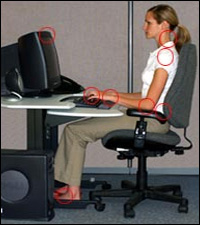
Millions of people work with computers every day. This eTool* illustrates simple, inexpensive principles that will help you create a safe and comfortable computer workstation. There is no single "correct" posture or arrangement of components that will fit everyone. However, there are basic design goals, some of which are shown in the accompanying figure, to consider when setting up a computer workstation or performing computer-related tasks.
Consider your workstation as you read through each section and see if you can identify areas for improvement in posture, component placement, or work environment. This eTool provides suggestions to minimize or eliminate identified problems, and allows you to create your own "custom-fit" computer workstation.

Use a Checklist!
Use the evaluation checklist to analyze existing workstations. Use the purchasing guide checklist to evaluate new purchases.
Quick Tips
Look for quick tip boxes to provide basic solutions for common hazards. A more in-depth look at computer workstation hazards and solutions can be found further down the page of each section.
See OSHA's Workers' Rights page for more information on rights and protections.
Click on item to highlight affected area.
Roll mouse over text below to highlight specific areas in the image.
*eTools are stand-alone, interactive, highly illustrated web-based training tools on occupational safety and health topics. Some use expert system modules, which enable users to answer questions and receive reliable advice on how OSHA regulations apply to their work site. Some provide guidance information for developing a comprehensive safety and health program and include other recommended practices that often go beyond specific OSHA requirements. As indicated in the disclaimer, eTools do not create new OSHA requirements.